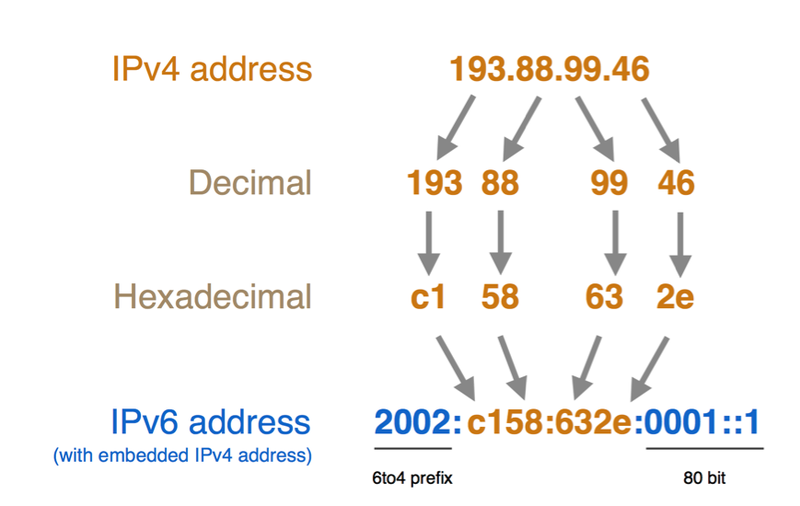
IPv4 has powered internet connectivity for decades, but its limited address supply has increased the need for IPv6 adoption. IPv6 is the next-generation protocol, offering a vastly larger address space, better scalability, and excellent network efficiency. Knowing how to change IPv4 to IPv6 address configuration requires careful planning, device compatibility verification, and accurate network settings to ensure smooth connectivity, reliable performance, and avoid unnecessary configuration errors.
Things to Check Before Changing IPv4 to IPv6
Dual Stack Configuration
To change your network, confirm that your devices and router are able to use Dual Stack. This is one of the ways that IPv4 can coexist with IPv6 throughout the migration process. It helps maintain connectivity without causing compatibility issues. Verify operating system support, firmware updates, and ISP compatibility prior to safe configuration changes.
IPv6 Tunnelling
IPv6 Tunnelling is completely helpful when your network relies on the idea to buy IPv4 address. It facilitates the transport of packets using IPv6 features using the existing IPv4 packets, pending full support of IPv6. Test your tunnel compatibility, network performance, firewall configurations, and your provider’s support. This will help to prevent disconnections and guarantee reliable communication during the move.
NAT64 Translation
NAT64 Translation enables communication between IPv6-only hosts and IPv4-only services. Be sure that the applications support NAT64 where it is important before you enable it. Test critical business or personal services before the change. This is important to check that there are no communication problems after the change process.
Why Should You Change IPv4 to IPv6 Configuration?
Larger Address Availability
IPv6 has a far greater address space than v4, and with it, billions more devices are connected. Perfectly supports home networks, businesses, cloud-based services, and Internet of Things devices growing without running into address limitations issues affecting traditional private or public IPv4 networks now.
Better Network Performance
IPv6 makes things easier to route: no more dealing with embedding information in packets and doing unnecessary network processes. IPv6 delivers better communication performance, best multicast functionality, and straightforward communication paths between devices on compatible networks.
Improved Future Compatibility
IPv6 has massive support from many services on the Web, operating systems, and Internet providers. The change to network configuration is possible through the use of new technologies. These technologies should be familiar with the modern infrastructure and minimize reliance to lease IPv4 addresses.
Common Problems When Changing IPv4 to IPv6
Device Compatibility Issues
The options for configuring IPv6 may not be as extensive on older routers, printers, network switches, or operating systems. This might hinder the possibility of effective communication post-migration. It is important to consider a few things before replacements or enabling IPv6 configuration throughout your network environment. Check hardware specs, install hardware firmware, and verify software compatibility.
Incorrect Configuration Settings
Setting the wrong gateway, DNS, and/or setting the wrong prefix lengths can interfere with the devices connecting correctly. Check each and every detail of the configuration setting before saving changes. Keep network configuration information at the Internet Service Provider level to reduce incorrect configurations and subsequent diagnosis.
Firewall and Security Restrictions
Certain rules have been part of the firewall for IPv4 that might not necessarily be applicable to traffic flowing through IPv6. Be sure to check your firewall configuration after you turn on IPv6. Ensure that security policies are updated and permit appropriate network access. Hence, they should be maintaining an ongoing, robust network security posture that prevents unauthorized network access and suspicious activity targeted at sensitive network operations.
ISP or Network Support Limitations
Not all Internet Service Providers (ISPs) and networks support the full deployment of IPv6. When no connectivity is achieved after configuring IPv6, check with your provider that IPv6 services have been enabled. If needed, reach out to technical support and check the settings of the router first before checking for any issues with the hardware or software.
IPv4 vs IPv6: Which Configuration Is Better?
The internet uses both formats of Internet Protocol (IPv4 and IPv6); while IP version 6 (IPv6) has several advantages for network use. Despite its limitations, and it’s possible that it will be replaced by IPv6, but IPv4 is still widely used today. But due to the scarcity of the address space, IPv6 is gaining importance.
IPv6 offers a significantly larger pool of IP addresses, better routing capabilities, native support for current security capabilities, and enhanced performance for expanding networks. IPv4 rent is perfect for some current setups. Above all, it will make for a more ideal long-term configuration for businesses or organizations that plan to expand in the future. In dual mode, operation of both protocols during the transition period is possible.
FAQs: Common Questions People Often Ask
1. Why is IPv6 better than IPv4?
The address space and scalability of IPv4 are comparatively small. There is not much support for new web technologies. IPv6 offers a generous amount of addresses, high scalability, and high support of new technologies on the internet.
2. Is it necessary to disable IPv4 when/after using IPv6?
No, most networks are dual-stack. This means that there is simultaneous running of both Internet protocol (IP) versions during the transition time.
3. How to know if your IPv6 configuration is not working?
You can verify you are using the right network, perform IPv6 connectivity tests, or use command-line tools to confirm that you have an IPv6 connection.
Secure Your Network Future with Reliable IP Solutions
Running out of IPv4 resources can limit your business growth and online connectivity. IPV4 TradeHub is a trusted platform offering reliable IP scaling support for companies, cloud service providers, and network operators. To grow your businesses, upgrade infrastructure, or seek business continuity, our expert staff can provide reliable solutions that require IPv4 addresses.